Skills as Curriculum: When Antigravity, When Apps Script, When Workspace Studio?
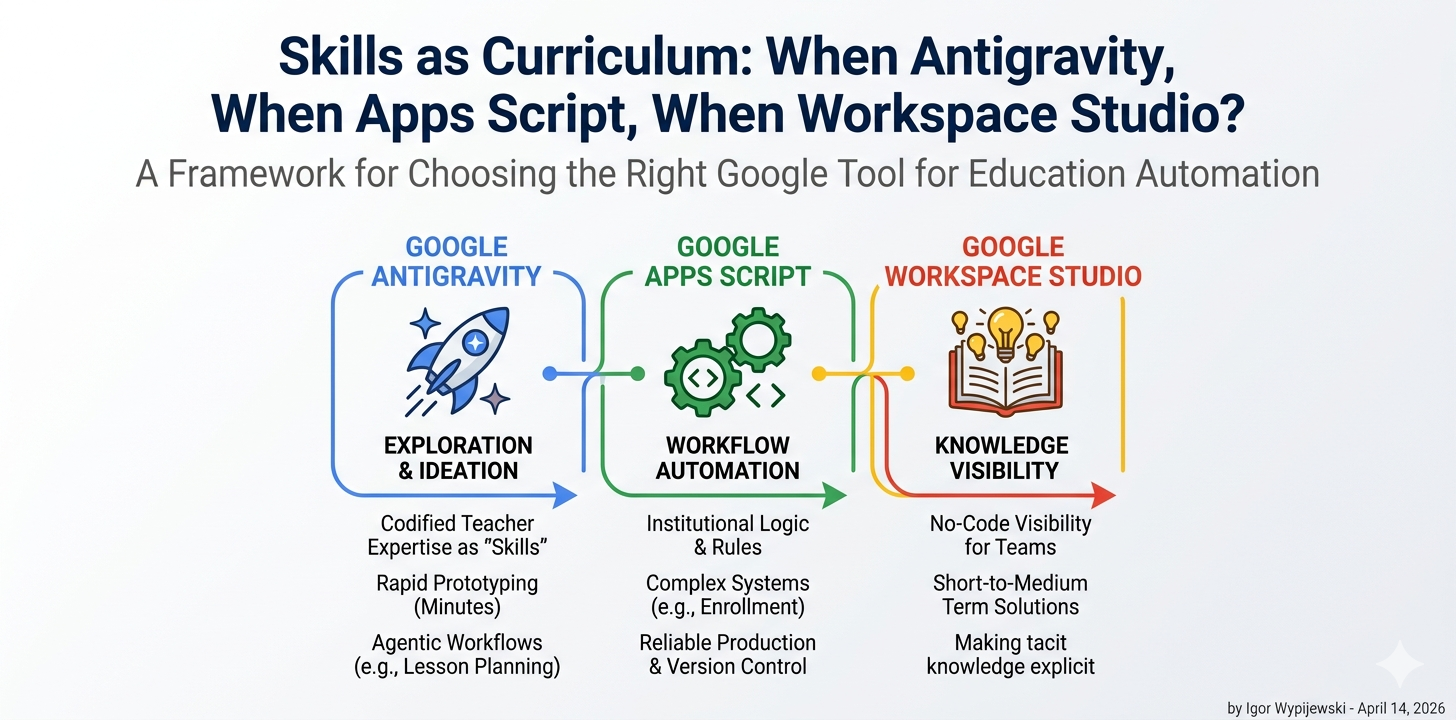
There’s a moment every school technologist knows: you’ve just built something that actually works — a real system, with real logic, real edge cases, and real users depending on it — and then a new tool arrives that promises to do “all of that” with a single prompt.
Google Antigravity arrived in November 2025 with exactly that energy.
Powered by Gemini 3 Pro, it’s an agent-first IDE where you don’t write code line by line — you describe outcomes and let autonomous agents plan, execute, and verify the work. It’s genuinely impressive. And it raises a legitimate question for anyone who has spent months building school automation in Apps Script: what exactly is this replacing, and what isn’t it replacing at all?
The answer lies in understanding three different concepts that are easy to conflate: agentic exploration, workflow automation, and production logic. Each maps to a different tool. Getting this wrong means either overengineering a simple task or — more dangerously — underengineering a complex one.
The enrollment system problem
At PSP Leonarda Piwoni in Szczecin, we run a Google Workspace environment for roughly 750 students across four schools. Last semester I built a complete enrollment management system in Apps Script: student card generation, a WebApp panel for secretariat approval workflows, one-time token-based sensitive data collection, contract PDF generation, and a cross-school transfer function.
This system exists because the problem it solves is structurally complex. Not technically complex in the sense of requiring rare knowledge — but complex in the sense that it encodes real institutional logic: who approves what, in what order, with what data, under what legal constraints (GDPR, Polish educational law), with what fallback when something goes wrong.
Could I have used Antigravity to build it?
Let me try to be precise rather than dismissive: Antigravity could have accelerated the exploration phase — the early prototyping where you’re figuring out whether a Sheets-based state machine is even the right architecture. An agent that can spin up a working Next.js prototype in minutes is genuinely useful when you’re still asking “what am I even building?”
But the production system? No. Not because Antigravity is incapable — it’s because the knowledge that makes the system work isn’t in any prompt. It lives in the institutional context: the specific workflow the secretariat uses, the edge case where a student transfers mid-year, the legal requirement that certain documents can’t be emailed. That knowledge has to be encoded somewhere deliberate and maintainable. In our case, that’s Apps Script with explicit version control and documented business logic.
This distinction — between exploration and production — is the first axis of any honest framework.
What a Skill actually is
Antigravity introduces a concept called a Skill: a directory-based package of knowledge that sits dormant until an agent’s task matches its description. You can define Skills globally (across all your projects) or at the workspace level (specific to one project).
The official framing is developer-centric: Skills help you encode team conventions, code review guidelines, deployment procedures. But read it differently and something more interesting appears.
A Skill is codified expertise on demand. You’re not writing a prompt — you’re writing a specification of what a domain expert would know, packaged so an agent can invoke it precisely when needed rather than loading it into every interaction.
For educators, this reframes the question entirely. A Skill isn’t “make AI do my job.” It’s closer to: what would I write down if I were training a capable assistant who had never worked in a school before?
A physics-worksheet-generator Skill might encode: the curriculum standards for Year 8 in Poland, the formatting conventions your students are used to, the typical misconceptions you want to address in problem design, and the output format that works best for printing on the school’s aged laser printer. None of that is general AI knowledge. All of it is your expertise, made reusable.
This is why the “Skills as Curriculum” framing isn’t just a catchy title. The Skill structure is a forcing function for making tacit teacher knowledge explicit — which is educationally valuable independent of whether the agent ever runs it.
Three axes, one decision
After working across all three tools — and watching colleagues reach for the wrong one repeatedly — I’ve found that three axes predict the right choice with reasonable accuracy.
Axis 1: Logic complexity. How much conditional branching, state management, and domain-specific rule encoding does the solution require? A simple “send a confirmation email when a form is submitted” is low complexity. “Validate enrollment data against existing records, generate a legal document, route for approval, handle rejection with re-submission, archive completed cases” is high complexity.
Axis 2: Audience reach. Who interacts with the result — and what are their technical capabilities and trust level? A tool I use myself can tolerate rough edges. A tool parents interact with cannot. A tool students use for learning has different requirements than a tool the secretariat uses for compliance.
Axis 3: Solution longevity. Is this a one-week experiment or a system that needs to run reliably for three years, survive staff turnover, and be debugable by someone who wasn’t in the room when it was built?
Plot your problem on these three axes and the tool choice becomes less ambiguous:
- Low complexity + short lifespan + teacher/staff audience → Antigravity Skills. Explore fast, fail cheap, learn what the real requirements are before committing to a production build.
- High complexity + long lifespan + any audience → Apps Script. Full control over logic, integration with Workspace APIs, explicit versioning, debuggable, GDPR-compliant when built carefully.
- Low-to-medium complexity + short-to-medium lifespan + staff or student audience wanting no-code visibility → Workspace Studio. The right tool for showing non-technical colleagues how automation works before deciding whether to invest in a proper build.
The interactive tool at workspace.edu.pl/tools/edu-tool-selector lets you map your specific situation to a recommendation with example snippets for each case — try it before reading further.
The thing Antigravity changes that isn’t about code
There’s a quieter shift happening that the “agentic IDE” framing obscures.
When a teacher builds an Antigravity Skill for generating differentiated homework tasks, they’re doing something that previously required either programming knowledge or a long, fragile prompt they’d lose track of. The Skill architecture gives that teacher a durable artifact — something that persists, can be refined over time, and can be shared with colleagues.
This matters for schools specifically because teacher expertise is notoriously non-transferable. When a great teacher leaves, the institutional knowledge they carried — about how to scaffold a particular concept, which examples resonate with which student profiles, what questions reveal misconceptions — largely leaves with them. Skills don’t solve this fully, but they create a new category of artifact where that knowledge can live.
The deeper educational technology question isn’t “which tool is most powerful?” It’s “which tool helps the most important knowledge become explicit, transferable, and improvable over time?”
By that measure, Antigravity Skills and Apps Script are not competitors. They operate at different layers of the same problem. And understanding that distinction is, I’d argue, the most practically useful thing a school technologist can take from the arrival of agentic development platforms.
A note on what this isn’t
This framework is deliberately practical rather than comprehensive. It doesn’t account for every scenario — particularly the emerging space of multi-agent workflows where Antigravity’s Agent Manager coordinates parallel tasks across a project. That’s a genuinely different capability that deserves its own analysis.
It also doesn’t resolve the question of whether agentic IDEs belong in student hands at all — which is a more complex pedagogical and ethical question than this article addresses. (Short version: for Year 7–8 informatics, I think the answer is “yes, carefully, with explicit discussion of what the agent is and isn’t doing.” But that’s another piece.)
What it does give you is a decision heuristic that holds up under real school conditions: match the tool to the layer of complexity, the durability requirement, and the audience you’re building for.
The enrollment system stays in Apps Script. The worksheet generator becomes a Skill. The quick demo for the parent meeting uses Workspace Studio.
And none of them is the wrong answer — as long as you’re asking the right question first.
Igor Wypijewski is Director of Innovation & Educational Technology at Prywatne Szkoły Leonarda Piwoni in Szczecin, a Google for Education Reference School. He writes about practical AI implementation, Google Workspace automation, and the gap between EdTech promise and classroom reality at workspace.edu.pl.