The Multi-Window Protocol: Why Your Students Think AI is 'Broken'
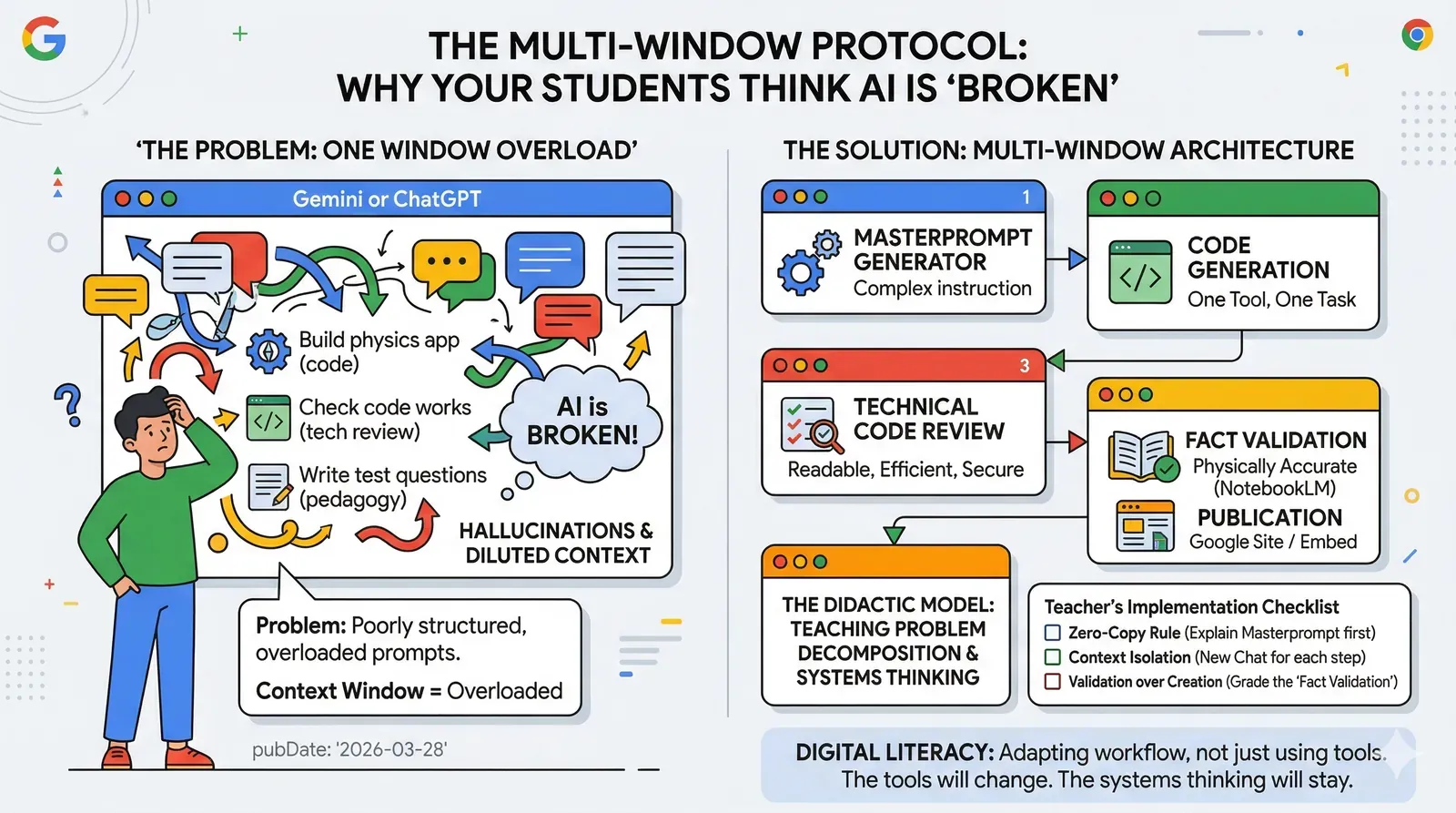
AI doesn’t give bad answers because it’s “bad.” It gives bad answers because it receives bad questions—overloaded, imprecise, and structurally chaotic. Before we complain about the results, we must ask: how are we actually teaching students to interact with Large Language Models (LLMs)?
The Problem Seen in Every Classroom
A typical student opens Gemini or ChatGPT and types: “Build me a physics app about concave mirrors, check the code to make sure it works, and write some test questions for it.”
The model responds. The student is dissatisfied. They claim “AI doesn’t work.”
The issue isn’t the model; it’s the prompt architecture. The student assigned three distinct tasks requiring three different cognitive modes: creation, technical verification, and pedagogy. For a human, this would be taxing. For an LLM, it’s a recipe for “hallucinations” as each subsequent task dilutes the context of the previous one. This isn’t a technical error—it’s a methodological one. And it’s entirely fixable.
Context Windows and Educational Strategy
LLMs operate within a context window—a finite space where they “see” the entire conversation. The longer the thread and the more tasks stacked on top of each other, the more the model loses focus. This is a fundamental trait of transformer network attention architecture.
A student who understands this gains a mental model useful far beyond AI: One Tool, One Task. Precision in instruction equals quality in output. Developers know this as the Single Responsibility Principle; systems engineers call it Problem Decomposition.
Digital literacy isn’t just knowing how to use tools. It’s understanding how the tools “think”—and adapting your workflow accordingly.
The Multi-Window System: It’s Not About the Tech
Splitting work into several specialized windows isn’t just a technical optimization; it’s a didactic model. It teaches students that complex problems must be broken down into simpler ones before they can be solved.
Implementation Blueprint: Grades 7–8
- Window 1: The Masterprompt Generator Students enter a simple intent. The model returns a sophisticated, engineering-grade prompt. The Checkpoint: Before moving forward, the student must explain to the teacher in one sentence what they just commissioned.
- Window 2: Code Generation A fresh chat. Only the masterprompt from Step 1 is used. Full model focus on a single task. Best used with Gemini’s code execution features.
- Window 3: Technical Code Review A new chat. Students paste the code and ask specific questions: Is it readable for a peer? Is it secure? Improved code or change instructions go back to Window 2.
- Window 4: Fact Validation (The Reality Check) A new chat, ideally in NotebookLM, loaded with textbook excerpts. The question isn’t “Does the code work?” but “Is the simulation physically accurate?”
- Window 5: Publication The verified code is embedded in a class Google Site. Every app gets a URL.
🛠️ Build Your Protocol
Use the tool below to generate a high-fidelity masterprompt for Window 1. This generator enforces the “Pure Google Ecosystem” rules (Apps Script & Google Sites) to ensure the generated code actually works in your school environment.
Masterprompt Architect
Why This Works Better Than a “Demo”
Most classroom AI introductions stop at the demonstration stage: the teacher shows that AI can answer a question or summarize a text. The students are impressed, but they haven’t learned a thing.
The Multi-Window System doesn’t just show AI’s capabilities; it presents students with a structural problem and gives them the framework to solve it. In this process, AI is the means, not the end. The goal is to understand that tool quality depends on instruction quality, that complex problems require decomposition, and that even a great tool can be used poorly.
The tools will change. The systems thinking will stay.
🛠️ Teacher’s Implementation Checklist:
- Zero-Copy Rule: Students cannot move to Window 2 without explaining the Masterprompt.
- Context Isolation: Ensure each window is a New Chat to avoid context bleed.
- Validation over Creation: Grade the “Fact Validation” step higher than the final app’s aesthetics.